What Did the Model Actually See?
Introducing AgentScript, a small language for explicit, scoped, auditable LLM context.
Many programmers of my generation first learned computing through a simple model: input, processing, output.
A program receives data, transforms it, and produces a result. It is an old mental model, but still a useful one. It made programs feel understandable because the boundaries were visible.
LLM agents stretch that model.
The input is no longer just a file, a request, or a record with a known schema. It is prompt context: user intent, tool observations, retrieved documents, memory records, intermediate state, retry messages, and outputs from other agents.
The output is no longer just a return value. It is generated text or JSON that may need to satisfy a contract before the next step can trust it.
Most agent programs do not fail because calling a model is hard.
They fail because nobody can tell, with confidence, what the model actually saw before it generated the next value.
After a few iterations, an agent has local variables, tool results, memory records, intermediate observations, retry messages, and outputs from other agents. Some of that data should reach the next model call. Some should not. In most Python or TypeScript agents, that boundary is maintained by convention.
That works for small demos. It becomes fragile in real workflows.
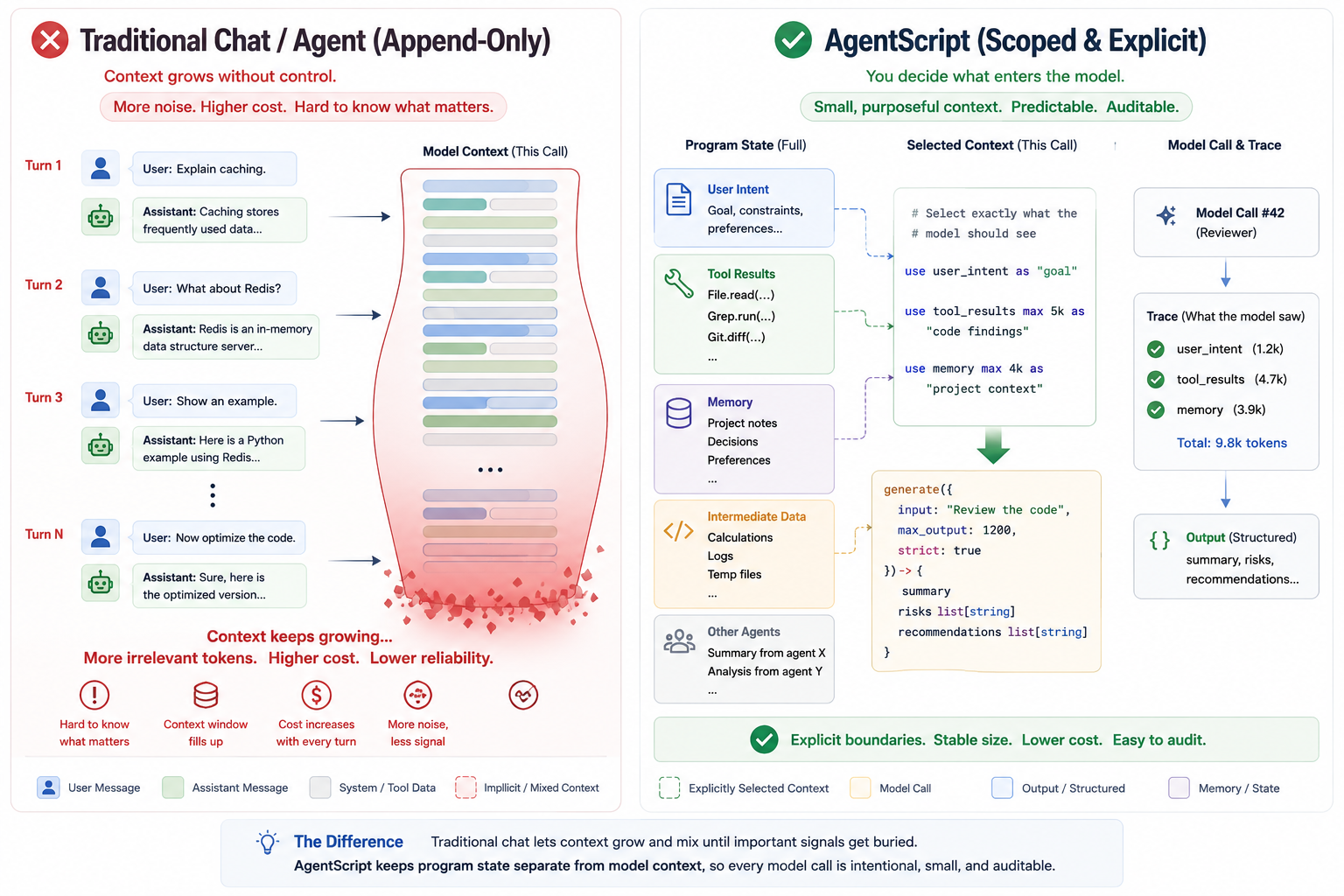
What did the model actually see? Which tool result was included in the prompt, and which one was only local data? Was memory clipped? Did another agent's output enter as evidence or as prior assistant text? What exactly must the model return before that value flows into the next step?
AgentScript is an experiment in making those questions answerable from the program itself.
What AgentScript Is
AgentScript is a small language for building LLM agents where prompt context is explicit, scoped, typed, traceable, and auditable.
It is aimed at developers building multi-step agents where tool output, memory, intermediate state, and generated values must be controlled and audited.
It is not a prompt template format. It is not YAML configuration. It is not a general-purpose agent framework.
Its core idea is simple:
Agent context should be code.
The two most important language features are use and generate.
use content max 8k as "file content"

generate({
    input: "Summarize the file for a busy teammate",
    max_output: 1000
}) -> {
    title
    summary
    key_points: list[string]
    action_items: list[string]
}
use declares what the model is allowed to see. generate declares where the
model is called and, when needed, what contract its output must satisfy. In the old
input/process/output framing, AgentScript puts language-level attention on the
two unstable edges of LLM programs: prompt input and generated output.
The important part is not that AgentScript can call an LLM. The important part is that the prompt boundary is visible in the code.
Everything else in the language exists to support that workflow: variables, functions, agents, imports, loops, tools, memory, and trace output.
Why Not Just Use Python or TypeScript?
Python and TypeScript are excellent general-purpose languages, and AgentScript is not trying to replace them.
The problem is that they do not have a native concept of prompt context. Context usually appears as strings, arrays, objects, templates, framework calls, or message lists. The program can be correct, but the intent is scattered across ordinary code:
const messages = [
  system("You are a reviewer"),
  user(`Question: ${input.question}`),
  user(`Search results: ${JSON.stringify(results)}`),
  user(`Memory: ${memory.map((item) => item.text).join("\n")}`),
];

const answer = await model.generate(messages);
Which fields from results are included? Was raw tool output included? Was
memory clipped? Did another agent's output enter as evidence or as prior
assistant text? What schema must answer satisfy?
AgentScript makes context selection a first-class operation:
use input.question as "user question"
use results.summary max 4k as "search results"
use past max 2k as "past lessons"

generate({
    input: "Answer using only the selected context",
    max_output: 800,
    strict: true
}) -> {
    answer
    citations: list[string]
}
Labels can be simple identifiers or quoted strings.
Local variables do not enter prompts automatically. Tool results do not enter prompts automatically. Memory query results do not enter prompts automatically. Trace events do not enter prompts automatically.
If data should be visible to the model, it must be selected with use.
That one rule changes the contract of agent development. The prompt is no longer a side effect of arbitrary string assembly. It is a scoped contract.
A Minimal Example
Here is a complete file summarizer:
import llm Qwen from "ollama://localhost:11434/qwen3.6"
import tool File from "file://workspace"

main agent FileSummarizer {
    model Qwen
    role "Technical Writer"
    description "Read one local file and produce a useful structured summary."

    main func(input { path: string }) {
        file = File.read({
            path: input.path
        })

        use input.path as "source path"
        use file.content max 8k as "file content"

        generate({
            input: "Summarize the file for a busy teammate",
            max_output: 1000
        }) -> {
            title
            summary
            key_points: list[string]
            action_items: list[string]
        }
    }
}
The file tool can read from the workspace, but the tool result does not implicitly become prompt context. The program explicitly selects the path and file content, labels them, gives the content a budget, and then asks the model for a structured result.
Run it with a real model:
agentscript recipes/summarize-file.as --input '{"path":"README.md"}'
Or try it immediately with deterministic output and a trace:
npm install -g @rong/agentscript
agentscript recipes/summarize-file.as --input '{"path":"README.md"}' --mock --trace
Run it with a deterministic mock model:
agentscript recipes/summarize-file.as --input '{"path":"README.md"}' --mock
Inspect the prompt and trace without calling a model:
agentscript recipes/summarize-file.as --input '{"path":"README.md"}' --dry-run
Print an auditable trace:
agentscript recipes/summarize-file.as --input '{"path":"README.md"}' --trace
The trace can show which context sources were selected, which budgets were applied, what was clipped, which instruction was used, what output contract was requested, and whether validation passed. That trace is for debugging and audit. It is not itself prompt context.
For example, the useful part of a trace is not just that a model was called. It is the boundary around that call:
Generate #1
Agent: FileSummarizer / Technical Writer
Selected context:
  [source path] input.path
  [file content] content, budget=8k, clipped=false
Instruction:
  Summarize the file for a busy teammate
Output contract:
  title: string
  summary: string
  key_points: list[string]
  action_items: list[string]
Validation: ok
generate Is the Only LLM Call Site
In AgentScript, ordinary code can compute values, call tools, query memory, call
other agents, and organize intermediate state. Only generate asks a model to
produce new output.
answer = generate({
    input: "Answer using only the selected context.",
    max_output: 800,
    attempts: 3,
    strict: true
}) -> {
    ok: boolean
    answer
    citations: list[string]
}
The contract after -> is an output contract. AgentScript can ask providers for
structured output when possible, validate the returned value, and retry when the
model returns invalid JSON or a mismatched contract. Downstream code can then depend
on the returned contract instead of parsing prose.
This gives each model call a visible boundary:
- the current agent identity
- the selected context from visible
usedeclarations - the local instruction in
generate({ input: ... }) - the optional output contract after
->
That boundary is the unit you can review, debug, and trace.
Scope Is the Context Boundary
AgentScript uses scope to control prompt visibility.
This is also a way to avoid the pressure of long conversations. In a traditional chat loop, each step tends to append more messages to the same history. The context grows heavier over time, and the next model call inherits whatever the conversation happened to accumulate.
AgentScript treats each generation differently. Before a generate, the program
selects the visible context deliberately with use: the specific values, labels,
and budgets that matter for this step. It is closer to precise sampling than to
endless appending.
A use declaration is visible to later generate calls in the same scope and
child scopes. It does not leak upward. Function calls and agent calls create
independent context boundaries.
func caller(input) {
    use input.goal as goal
    helper(input)
}

func helper(input) {
    use input.detail as detail

    generate({ input: "Work on the detail" }) -> {
        ok: boolean
    }
}
The generate inside helper sees input.detail. It does not automatically
inherit caller's selected goal context.
Agent calls are isolated in the same way. A called agent sees the input value passed to it and the context selected inside its own functions. It does not inherit the caller's prompt context.
That makes multi-agent composition easier to audit. Each agent has its own prompt contract instead of sharing an ambient conversation buffer.
Tool Results Are Data, Not Prompt
One of AgentScript's most important rules is that tool results are local program data. They are not prompt context until selected.
This matters in repository review, research, code analysis, and any workflow where tools can return much more data than the model should see.
A repository review can collect a file tree, TODO matches, package metadata, and CI configuration. The review step can then choose only the relevant pieces:
use "file tree"          budget=8k
use "todo findings"      budget=4k
use "package metadata"   budget=4k
use "ci configuration"   budget=4k
generate                 blockers, risks, quick_wins, next_steps
The distinction is deliberate.
Tools expand what the program can do. use controls what the model can see.
Memory Is Explicit Too
AgentScript includes file JSONL and SQLite memory backends, but memory follows the same rule as everything else.
The memory handle is a capability, not prompt data:
import memory Lessons from "file://./.agentscript/lessons.jsonl"
The agent must query memory, receive ordinary data, and then explicitly select that data if it should influence the next generation:
past = Lessons.query({
    text: input.goal,
    kind: "lesson",
    limit: 5
})

use input.goal as goal
use past max 2k as "past lessons"
Writing to memory is also explicit:
Lessons.add({
    kind: "lesson",
    text: reflection.insight,
    goal: input.goal
})
This supports reflection and self-improvement without automatic context growth.
A future run can use durable lessons, but only through a visible query and a
visible use.
Agent Patterns as Composable Primitives
AgentScript does not hardcode agent patterns as keywords.
There is no special planner keyword. No special executor keyword. No special
reflect keyword. Those names are just agents, functions, or ordinary data in
your program.
That is intentional. ReAct, plan-and-execute, evaluator-optimizer, reflection, self-improvement, and multi-agent workflows can all be built from the same small set of primitives:
- agents and functions for boundaries
- tools for external capabilities
- memory for durable explicit state
usefor prompt context selectiongeneratefor model calls and output contracts- trace for auditability
For independent bounded work, AgentScript also provides parallel for:
results = parallel for step in plan.steps max 10 {
    Executor({
        goal: input.goal,
        step: step
    })
}
For bounded independent work, parallel for is designed for multi-agent and
multi-generate bottlenecks without exposing async/await.
The result is still local data. It enters a later prompt only if selected:
use results.summary max 6k as execution_results
Current Status
AgentScript is experimental, but the core language design is now in place.
Currently implemented:
- parser
- semantic checker
- mock runtime
- OpenAI, Anthropic, and Ollama LLM adapters
- file, environment, HTTP, and shell-style host tools
- JSONL and SQLite memory backends
- structured output validation
- trace output
- arithmetic and comparison operators
- compound assignment
parallel for- runtime concurrency control for
parallel for - CLI support for
--mock,--dry-run,--trace,--trace-file,--check, and--concurrency
The implementation is usable for experimentation, examples, and local workflows, but the language is still pre-1.0 and may change.
Planned work includes a stable IR, richer diagnostics, and VS Code syntax support.
The project is still early. The goal right now is not to claim that AgentScript is a mature production framework. The goal is to test a sharper language idea:
What if the most important part of an agent program is not the framework around the model call, but the context contract before it?
Try It
Install the CLI:
npm install -g @rong/agentscript
Run a recipe:
agentscript recipes/summarize-file.as --input '{"path":"README.md"}'
Run without installing:
npx @rong/agentscript recipes/code-review.as --input '{"path":"src"}'
Use mock mode for deterministic local checks:
agentscript recipes/summarize-file.as --input '{"path":"README.md"}' --mock
Use trace mode when you want to inspect what happened:
agentscript recipes/summarize-file.as --input '{"path":"README.md"}' --trace
Project links:
- npm: https://www.npmjs.com/package/@rong/agentscript
- GitHub: https://github.com/rongzhou/agentscript
Closing Thought
LLM agents are often described in terms of tools, memory, planning, and autonomy. Those things matter, but they all depend on a more basic question:
What exactly did the model see before it generated the next value?
AgentScript is built around that question. It treats prompt context as something you declare, scope, budget, label, validate, and trace.
That is the language's bet: reliable agents need context engineering to be a programming model, not a pile of conventions.