CLI and REPL Workflow
After the quickstart, the next useful skill is knowing how to run, inspect, and debug AgentScript programs from the terminal.
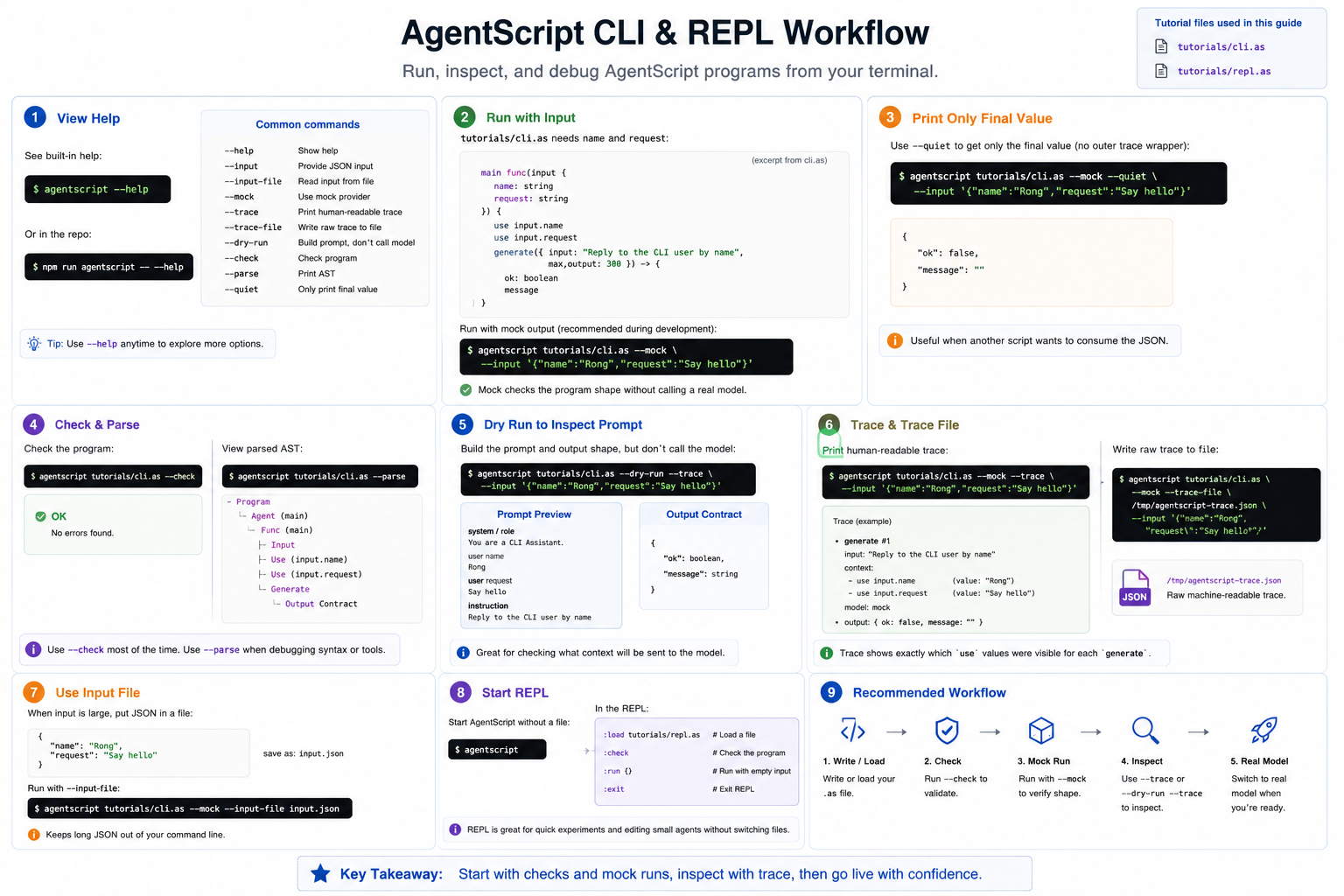
This tutorial uses two small source files:
1. Get Help
Start with the built-in help:
agentscript --help
If you are working from the repository, use:
npm run agentscript -- --help
2. Run With Input
tutorials/cli.as expects name and request:
import llm Qwen from "ollama://localhost:11434/qwen3.6"

main agent {
    model Qwen
    role "CLI Assistant"
    description "Answer a short request from a command-line user."

    main func(input {
        name: string
        request: string
    }) {
        use input.name
        use input.request

        generate({ input: "Reply to the CLI user by name", max_output: 300 }) -> {
            ok: boolean
            message
        }
    }
}
Run it with mock output:
agentscript tutorials/cli.as --mock --input '{"name":"Rong","request":"Say hello"}'
Use --mock while developing. It checks the program shape without calling a
real model.
3. Print Only the Value
Use --quiet when you want only the final value, without the trace wrapper:
agentscript tutorials/cli.as --mock --quiet --input '{"name":"Rong","request":"Say hello"}'
This is handy when another script will consume the JSON.
4. Check and Parse
Before running a program, you can ask the CLI to check it:
agentscript tutorials/cli.as --check
You can also inspect the parsed AST:
agentscript tutorials/cli.as --parse
Most users reach for --check more often. --parse is mainly useful when
debugging syntax or tooling.
5. Inspect Prompts With Dry Run
--dry-run builds the prompt and output shape without calling a model:
agentscript tutorials/cli.as --dry-run --trace --input '{"name":"Rong","request":"Say hello"}'
Use this when you want to inspect what context would be sent to the model.
6. Trace and Trace Files
Print a readable trace:
agentscript tutorials/cli.as --mock --trace --input '{"name":"Rong","request":"Say hello"}'
Write the raw trace to a file:
agentscript tutorials/cli.as --mock --trace-file /tmp/agentscript-trace.json --input '{"name":"Rong","request":"Say hello"}'
The trace is one of the best ways to debug context boundaries. It shows which
use statements were visible to each generate.
7. Use an Input File
For larger input, write JSON to a file:
{
  "name": "Rong",
  "request": "Say hello"
}
Then run:
agentscript tutorials/cli.as --mock --input-file input.json
8. Start the REPL
Start AgentScript with no file:
agentscript
Inside the REPL, load a file:
:load tutorials/repl.as
Check it:
:check
Run it:
:run {}
Exit:
:exit
The REPL is useful when you are sketching a small agent or checking syntax without constantly switching files.
9. Suggested Workflow
When developing a new agent:
- Write or load the
.asfile. - Run
--check. - Run with
--mock. - Inspect with
--traceor--dry-run --trace. - Switch to a real model only after the shape is right.