Multi-Agent Basics
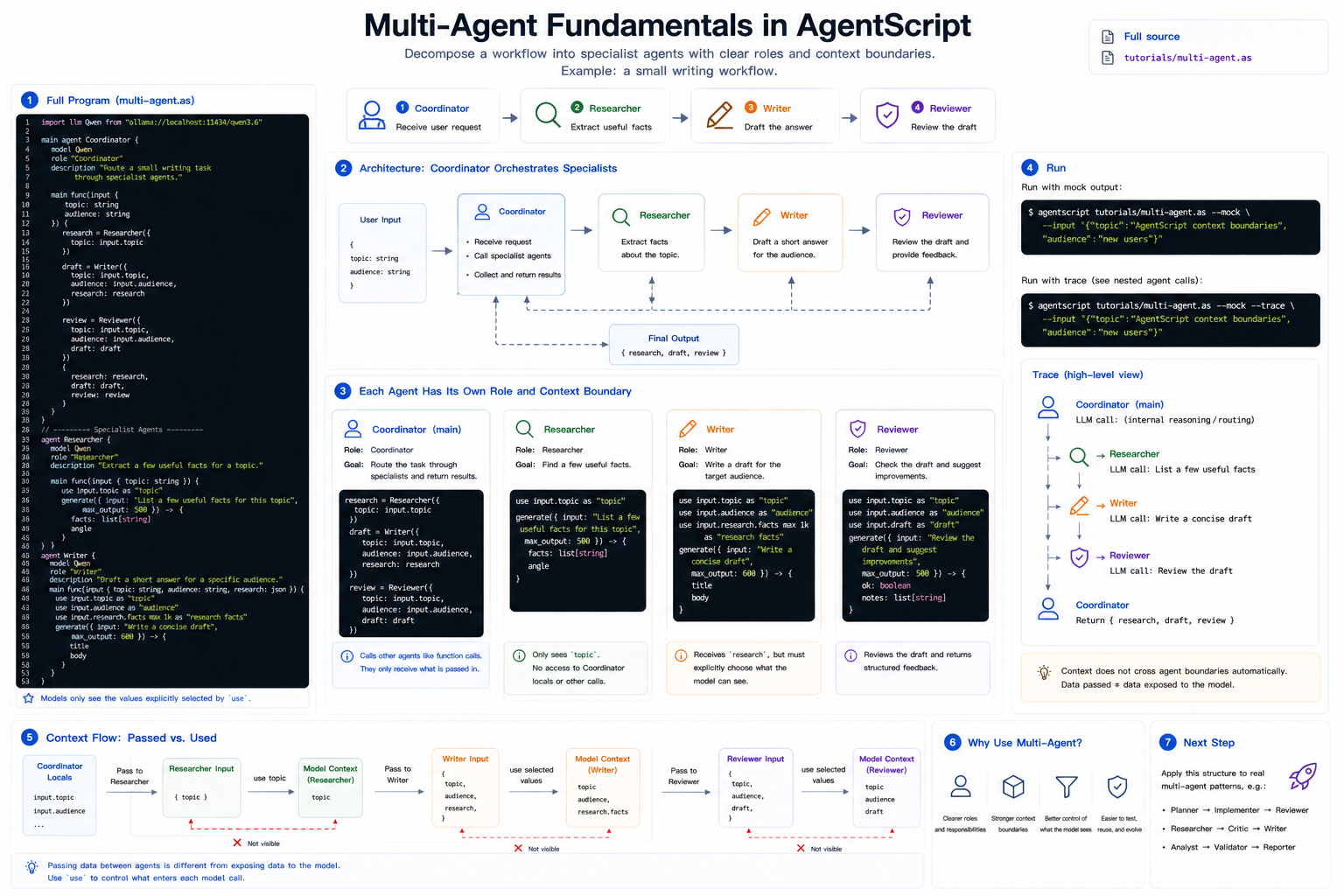
A multi-agent program splits one workflow into named agents with separate roles and context boundaries. The goal is not to make things more complicated; it is to make responsibilities visible.
This tutorial builds a small writing workflow:
Coordinatorreceives the user request.Researcherextracts facts.Writerdrafts an answer.Reviewerchecks the draft.
Full source: ../../../tutorials/multi-agent.as
1. The Complete Program
Create multi-agent.as, or open the repository copy at
tutorials/multi-agent.as:
import llm Qwen from "ollama://localhost:11434/qwen3.6"

main agent Coordinator {
    model Qwen
    role "Coordinator"
    description "Route a small writing task through specialist agents."

    main func(input {
        topic: string
        audience: string
    }) {
        research = Researcher({
            topic: input.topic
        })

        draft = Writer({
            topic: input.topic,
            audience: input.audience,
            research: research
        })

        review = Reviewer({
            topic: input.topic,
            audience: input.audience,
            draft: draft
        })

        {
            research: research,
            draft: draft,
            review: review
        }
    }
}

agent Researcher {
    model Qwen
    role "Researcher"
    description "Extract a few useful facts for a topic."

    main func(input {
        topic: string
    }) {
        use input.topic as "topic"

        generate({ input: "List a few useful facts for this topic", max_output: 500 }) -> {
            facts: list[string]
            angle
        }
    }
}

agent Writer {
    model Qwen
    role "Writer"
    description "Draft a short answer for a specific audience."

    main func(input {
        topic: string
        audience: string
        research: json
    }) {
        use input.topic as "topic"
        use input.audience as "audience"
        use input.research.facts max 1k as "research facts"

        generate({ input: "Write a concise draft", max_output: 600 }) -> {
            title
            body
        }
    }
}

agent Reviewer {
    model Qwen
    role "Reviewer"
    description "Review whether a draft fits the topic and audience."

    main func(input {
        topic: string
        audience: string
        draft: json
    }) {
        use input.topic as "topic"
        use input.audience as "audience"
        use input.draft as "draft"

        generate({ input: "Review the draft and suggest improvements", max_output: 500 }) -> {
            ok: boolean
            notes: list[string]
        }
    }
}
2. Coordinator Calls Other Agents
Agent calls look like function calls:
research = Researcher({
    topic: input.topic
})
Researcher receives only the object passed to it. It does not automatically see
the coordinator's local variables, prompt context, or previous agent calls.
3. Each Agent Has Its Own Role
Researcher, Writer, and Reviewer each declare their own role and
description. That means each model call gets a different identity, even though
the program uses the same LLM provider.
This is the practical reason to split agents: the prompt identity and context boundary become explicit.
4. Context Does Not Automatically Cross Agents
Writer receives research as input, but it still has to choose what to show
the model:
use input.research.facts max 1k as "research facts"
Passing data between agents and exposing data to the model are two different steps.
5. Run It
Run with mock output:
agentscript tutorials/multi-agent.as --mock --input '{"topic":"AgentScript context boundaries","audience":"new users"}'
Print the trace to see nested agent calls:
agentscript tutorials/multi-agent.as --mock --trace --input '{"topic":"AgentScript context boundaries","audience":"new users"}'
Next
The next tutorial can use this structure for a real multi-agent application pattern, such as planner → implementer → reviewer or researcher → critic → writer.