Build a Meta-Agent with Architect
This tutorial shows how to build an AgentScript meta-agent: an agent that helps create another AgentScript agent.
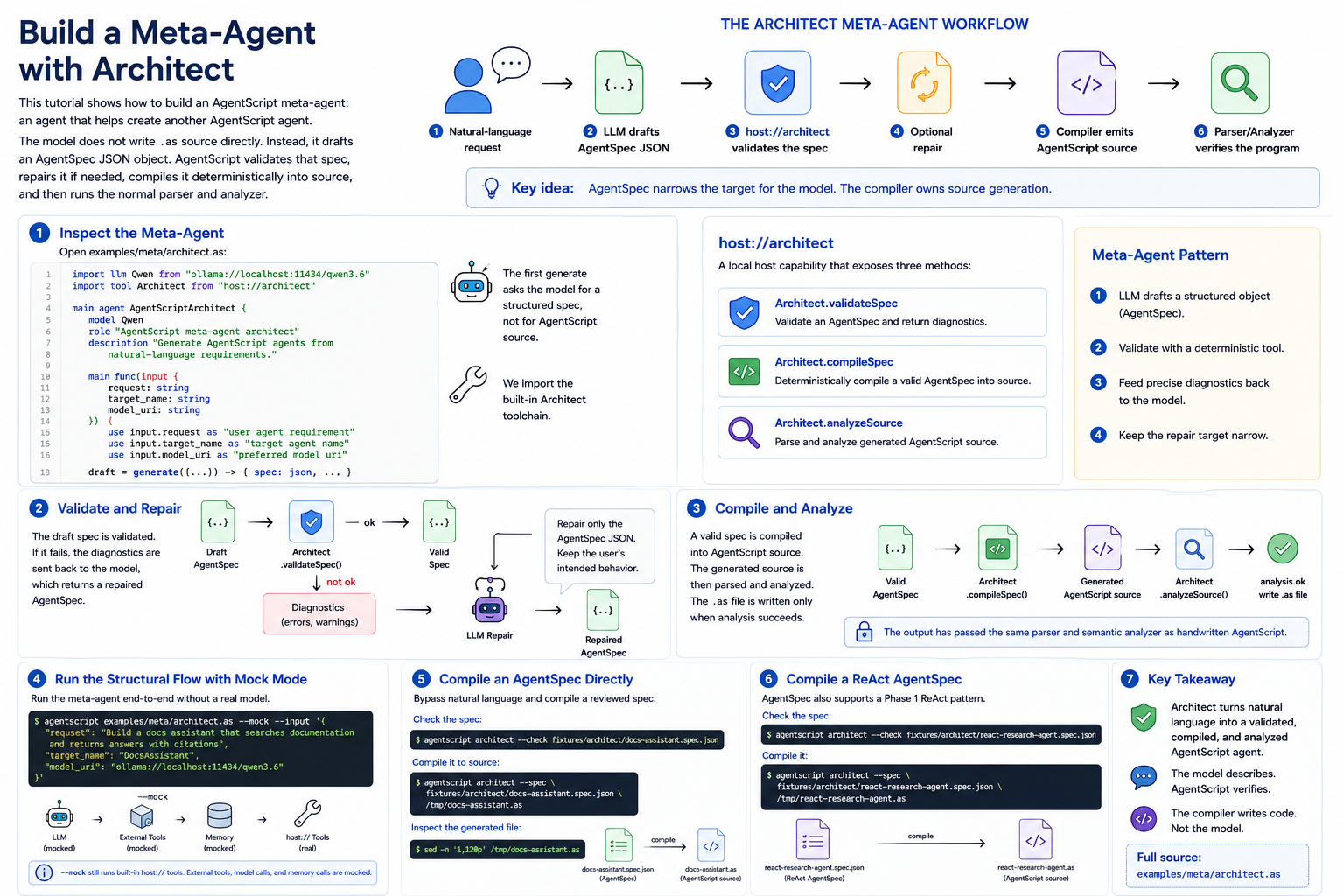
The important constraint is that the model does not write .as source
directly. Instead, it drafts an AgentSpec JSON object. AgentScript validates
that spec, repairs it if needed, compiles it deterministically into source, and
then runs the normal parser and analyzer on the generated program.
That gives the workflow a hard boundary:
natural-language request
  -> LLM drafts AgentSpec JSON
  -> host://architect validates the spec
  -> optional repair
  -> deterministic compiler emits AgentScript source
  -> parser/analyzer verifies the generated source
Full source:
examples/meta/architect.as
1. Why Not Ask the Model for Source?
LLMs can write code, but a direct "write AgentScript" prompt gives the model too much surface area:
- It can invent syntax.
- It can drift from the current AgentScript language design.
- It can produce source that looks plausible but fails semantic analysis.
- It can hide structural decisions inside prose.
AgentSpec narrows the target. The model only has to describe the agent as JSON:
- which model URI to import
- which inputs the agent accepts
- which tools it needs
- which tool results enter model context
- what the final generation instruction is
- what structured output fields the agent returns
The compiler then owns source generation.
2. Inspect the Meta-Agent
Open examples/meta/architect.as:
import llm Qwen from "ollama://localhost:11434/qwen3.6"
import tool Architect from "host://architect"

main agent AgentScriptArchitect {
    model Qwen
    role "AgentScript meta-agent architect"
    description "Generate AgentScript agents from natural-language requirements."

    main func(input {
        request: string
        target_name: string
        model_uri: string
    }) {
        use input.request as "user agent requirement"
        use input.target_name as "target agent name"
        use input.model_uri as "preferred model uri"

        draft = generate({
            input: "...",
            max_output: 9000
        }) -> {
            spec: json
            assumptions: list[string]
            missing_requirements: list[string]
        }

        validation = Architect.validateSpec({
            spec: draft.spec
        })
    }
}
The first generate call asks the model for a structured spec, not for
AgentScript source.
The imported tool is the built-in Architect toolchain:
import tool Architect from "host://architect"
host://architect is a local host capability. It exposes three methods:
Architect.validateSpecArchitect.compileSpecArchitect.analyzeSource
3. Validate and Repair
The meta-agent validates the draft spec:
validation = Architect.validateSpec({
    spec: draft.spec
})
If validation fails, it gives the model the diagnostics and asks for a repaired AgentSpec:
if not validation.ok {
    use draft.spec as "draft AgentSpec"
    use validation as "validation diagnostics"

    repair = generate({
        input: "Repair only the AgentSpec JSON object...",
        max_output: 9000
    }) -> {
        spec: json
        repair_summary: string
    }

    repaired = repair.spec
    repair_summary = repair.repair_summary
}
This is the key meta-agent pattern:
- Let the LLM draft a structured object.
- Validate it with a deterministic tool.
- Feed precise diagnostics back into the model.
- Keep the repair target narrow.
The repair prompt is not supposed to turn every request into the same example. It preserves the user's requested agent behavior and only fixes invalid AgentSpec shape, references, and types.
4. Compile and Analyze
After validation and optional repair, the meta-agent compiles the spec:
compiled = Architect.compileSpec({
    spec: repaired
})
If compilation succeeds, it analyzes the generated source:
if compiled.ok {
    source = compiled.source
    analysis = Architect.analyzeSource({
        source: source
    })
}
The CLI only writes the generated .as file when analysis.ok is true. This
means the output has passed the same parser and semantic analyzer as handwritten
AgentScript.
5. Run the Structural Flow with Mock Mode
You can run the example without a real model:
agentscript examples/meta/architect.as --mock --input '{
  "request": "Build a docs assistant that searches documentation and returns answers with citations",
  "target_name": "DocsAssistant",
  "model_uri": "ollama://localhost:11434/qwen3.6"
}'
In mock mode, the LLM returns deterministic placeholder values. That does not prove a useful agent will be generated, but it does prove the AgentScript program shape is valid and the host tool calls are wired correctly.
--mock still runs built-in host:// tools. External tools, model calls, and
memory calls are mocked.
6. Compile an AgentSpec Directly
You can bypass natural language entirely and compile a reviewed spec:
agentscript architect --check fixtures/architect/docs-assistant.spec.json
Then compile it to source:
agentscript architect --spec fixtures/architect/docs-assistant.spec.json /tmp/docs-assistant.as
Inspect the generated file:
sed -n '1,120p' /tmp/docs-assistant.as
This path is deterministic. The compiler does not call a model.
7. Compile a ReAct AgentSpec
AgentSpec also supports a Phase 1 ReAct pattern. The reviewed fixture is:
agentscript architect --check fixtures/architect/react-research-agent.spec.json
Compile it:
agentscript architect --spec fixtures/architect/react-research-agent.spec.json /tmp/react-research-agent.as
The generated source contains the ReAct loop:
scratch = []
use scratch.summary max 4k as "observations"
done = false

loop until done max 6 {
    thought = generate({
        input: "Look at the observations so far. Pick the next focused query, or set done=true if you can answer.",
        max_output: 400
    }) -> {
        focus: string
        done: boolean
    }

    obs = Search.query({
        q: thought.focus
    })
    scratch.add(obs)
    done = thought.done
}
The ReAct spec declares the loop structure in JSON:
{
  "pattern": "react",
  "react": {
    "max_iterations": 6,
    "scratch": { "label": "observations", "max": "4k" },
    "reason": {
      "input": "Look at the observations so far. Pick the next focused query, or set done=true if you can answer.",
      "max_output": 400,
      "output": {
        "fields": {
          "focus": { "type": "string" },
          "done": { "type": "boolean" }
        }
      }
    },
    "act": {
      "tool": "Search",
      "method": "query",
      "args": { "q": "thought.focus" }
    },
    "stop_when": "thought.done"
  }
}
Phase 1 ReAct is intentionally narrow: one reason step, one declared tool
method, one observation append, and a stop_when field. If you need the model
to dynamically choose among many tools at runtime, that is a future AgentSpec
pattern rather than this first ReAct lowering.
8. Generate an Agent from Natural Language
For an end-to-end meta-agent run, provide a model URI:
AGENTSCRIPT_LLM_TIMEOUT_MS=120000 \
agentscript architect \
  "build a docs assistant that searches documentation and returns answers with citations" \
  /tmp/docs-assistant.as \
  --model ollama://localhost:11434/qwen3.6:latest
The CLI uses examples/meta/architect.as internally. It passes three inputs to
the meta-agent:
request: the natural-language requirementtarget_name: inferred from the output file namemodel_uri: the preferred model URI for the generated agent
model_uri is a prompt hint, not a hard rewrite. Review the generated source
before running it.
9. Check the Generated Agent
After generation, run semantic analysis on the output:
agentscript /tmp/docs-assistant.as --check
You should also read the generated imports. A docs assistant generated from a minimal request may contain a placeholder tool URI such as:
import tool DocsSearchTool from "mcp://docs"
That is a reasonable assumption for a tutorial, but a real project should point the URI at an actual MCP server or tool provider.
10. Try a No-Tool Agent
The prompt is designed not to force every request into a retrieval shape. For a pure text task, it should produce an agent with no tool imports:
AGENTSCRIPT_LLM_TIMEOUT_MS=120000 \
agentscript architect \
  "build an email triage assistant that classifies an incoming email by urgency and category, explains the decision briefly, and suggests the next action" \
  /tmp/email-triage.as \
  --model ollama://localhost:11434/qwen3.6:latest
Check it:
agentscript /tmp/email-triage.as --check
For this kind of request, the useful design is usually:
- input fields such as
email_body,subject, andsender_name tools: []locals: []- model context containing the input fields
- output fields such as
urgency,category,reasoning, andnext_action
11. What This Pattern Guarantees
The Architect workflow guarantees a narrow but useful contract:
- A spec that passes validation compiles to legal AgentScript source.
- The compiler is deterministic and does not call an LLM.
- Generated source is checked by the same analyzer as handwritten source.
- Validator diagnostics are machine-readable enough for repair loops.
It does not guarantee the generated agent is the perfect product design. You still review assumptions, tool URIs, output fields, and prompts.
12. Next Steps
Use this pattern when you want model assistance for agent design without giving the model direct control over source text.
Good next experiments:
- Add more AgentSpec fixtures for your own project patterns.
- Tune
examples/meta/architect.asagainst your preferred local model. - Write a project-specific meta-agent that only emits specs for your approved tool URIs.
- Extend AgentSpec with a new pattern when
linearandreactare not enough.