Memory and Reflection
Memory lets an agent carry useful information across runs. Reflection is the small step that decides what is worth saving after a run finishes.
This tutorial builds a simple loop:
- Query relevant past lessons.
- Answer the current goal using those lessons.
- Reflect on the run.
- Store one new lesson.
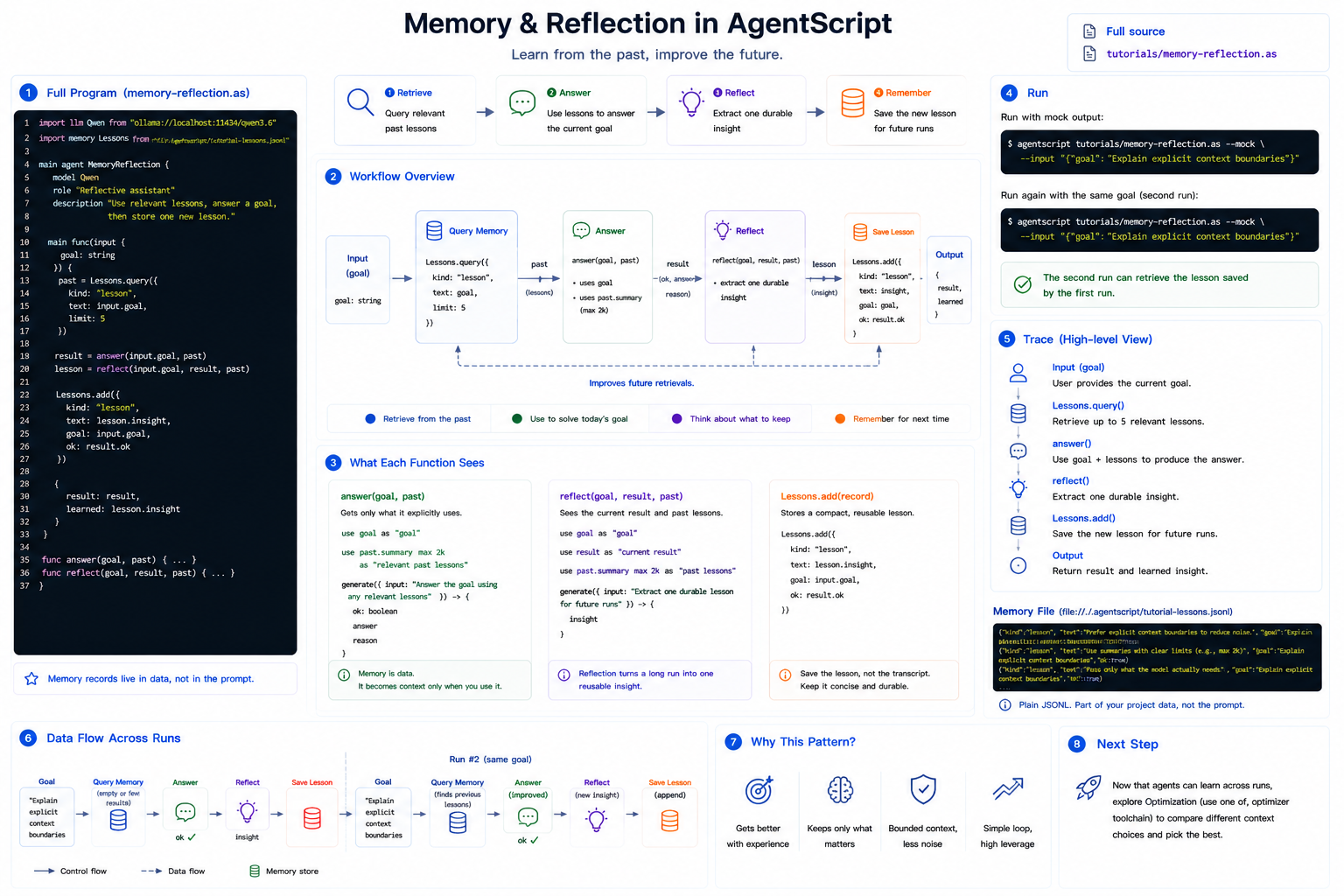
Full source: ../../../tutorials/memory-reflection.as
1. The Complete Program
Create memory-reflection.as, or open the repository copy at
tutorials/memory-reflection.as:
import llm Qwen from "ollama://localhost:11434/qwen3.6"
import memory Lessons from "file://./.agentscript/tutorial-lessons.jsonl"

main agent MemoryReflection {
    model Qwen
    role "Reflective assistant"
    description "Use relevant lessons, answer a goal, then store one new lesson."

    main func(input {
        goal: string
    }) {
        past = Lessons.query({
            kind: "lesson",
            text: input.goal,
            limit: 5
        })

        result = answer(input.goal, past)
        lesson = reflect(input.goal, result, past)

        Lessons.add({
            kind: "lesson",
            text: lesson.insight,
            goal: input.goal,
            ok: result.ok
        })

        {
            result: result,
            learned: lesson.insight
        }
    }

    func answer(goal, past) {
        use goal as "goal"
        use past.summary max 2k as "relevant past lessons"

        generate({ input: "Answer the goal using any relevant lessons", max_output: 700 }) -> {
            ok: boolean
            answer
            reason
        }
    }

    func reflect(goal, result, past) {
        use goal as "goal"
        use result as "current result"
        use past.summary max 2k as "past lessons"

        generate({ input: "Extract one durable lesson for future runs", max_output: 300 }) -> {
            insight
        }
    }
}
2. Import Memory
Memory is an explicit runtime capability:
import memory Lessons from "file://./.agentscript/tutorial-lessons.jsonl"
This example uses file memory, which stores JSONL records under .agentscript/.
The file is ordinary project data, not prompt context.
3. Query Past Lessons
The first step searches for relevant lessons:
past = Lessons.query({
    kind: "lesson",
    text: input.goal,
    limit: 5
})
Querying memory returns data to the program. It does not automatically show that data to the model.
4. Choose What the Model Sees
The answer function explicitly selects the goal and a bounded summary of past
lessons:
use goal as "goal"
use past.summary max 2k as "relevant past lessons"
This is the same context rule as before: memory records are ordinary data until
you select them with use.
5. Reflect and Store One Lesson
After answering, the agent asks a smaller reflection question:
lesson = reflect(input.goal, result, past)
Then it stores one durable lesson:
Lessons.add({
    kind: "lesson",
    text: lesson.insight,
    goal: input.goal,
    ok: result.ok
})
The important habit is to store compact lessons, not entire transcripts.
6. Run It
Run with mock model output:
agentscript tutorials/memory-reflection.as --mock --input '{"goal":"Explain explicit context boundaries"}'
Run it twice with the same goal. The second run can query the lesson stored by the first run.
To inspect the flow without real model calls, print the trace:
agentscript tutorials/memory-reflection.as --mock --trace --input '{"goal":"Explain explicit context boundaries"}'
Next
Memory introduces long-lived state. The next advanced topic is optimization:
using use one of and the optimizer toolchain to compare context choices.