Optimizer Toolchain
This is the longest tutorial in the series. It connects the previous ideas:
use one ofcreates named context choices.- An optimizer is an ordinary AgentScript program.
host://optimizergives that optimizer three tools:inspect,trial, andspecialize.- The optimizer output is still normal
.assource.
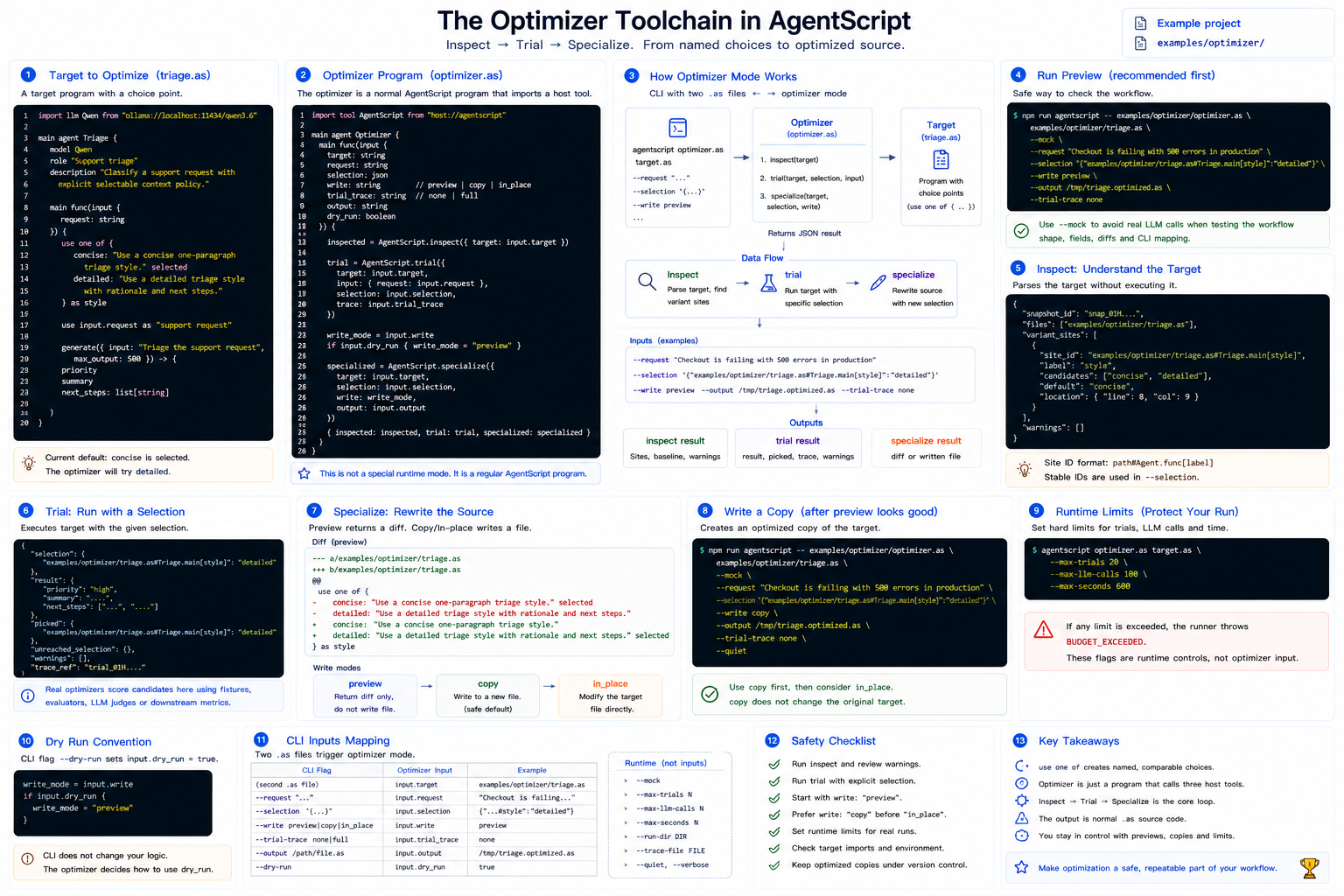
The tutorial uses the runnable example in
../../../examples/optimizer/.
1. What We Are Optimizing
The target program is ../../../examples/optimizer/triage.as:
import llm Qwen from "ollama://localhost:11434/qwen3.6"

main agent Triage {
    model Qwen
    role "Support triage"
    description "Classify a support request with explicit selectable context policy."

    main func(input {
        request: string
    }) {
        use one of {
            concise: "Use a concise one-paragraph triage style." selected
            detailed: "Use a detailed triage style with rationale and next steps."
        } as style

        use input.request as "support request"

        generate({ input: "Triage the support request", max_output: 500 }) -> {
            priority
            summary
            next_steps: list[string]
        }
    }
}
There is one choice point:
use one of {
    concise: "Use a concise one-paragraph triage style." selected
    detailed: "Use a detailed triage style with rationale and next steps."
} as style
The source currently defaults to concise. The optimizer will trial detailed
and preview the source rewrite that would move selected to that candidate.
2. The Optimizer Program
The optimizer is
../../../examples/optimizer/optimizer.as:
import tool Optimizer from "host://optimizer"

main agent OptimizerAgent {
    main func(input {
        target: string
        request: string
        selection: json
        write: string
        trial_trace: string
        output: string
        dry_run: boolean
    }) {
        inspected = Optimizer.inspect({
            target: input.target
        })

        trial = Optimizer.trial({
            target: input.target,
            input: {
                request: input.request
            },
            selection: input.selection,
            trace: input.trial_trace
        })

        write_mode = input.write
        if input.dry_run {
            write_mode = "preview"
        }

        specialized = Optimizer.specialize({
            target: input.target,
            selection: input.selection,
            write: write_mode,
            output: input.output
        })

        {
            inspected: inspected,
            trial: trial,
            specialized: specialized
        }
    }
}
This is not a special runtime mode inside the language. It is a normal AgentScript program that imports one explicit host tool.
3. Understand Optimizer CLI Mode
Optimizer mode starts when the CLI receives two positional .as files:
agentscript optimizer.as target.as --key value
The second file becomes input.target for the optimizer. Extra flags become
input fields:
--request "..."becomesinput.request--selection '{...}'becomesinput.selection--trial-trace nonebecomesinput.trial_trace--write previewbecomesinput.write
Reserved runtime flags such as --max-trials, --max-llm-calls,
--max-seconds, --run-dir, and --trace-file are used by the runner and are
not passed into optimizer input.
4. Run a Preview
From the repository root:
npm run agentscript -- examples/optimizer/optimizer.as examples/optimizer/triage.as \
  --mock \
  --request "Checkout is failing with 500 errors in production" \
  --selection '{"examples/optimizer/triage.as#Triage.main[style]":"detailed"}' \
  --write preview \
  --output /tmp/triage.optimized.as \
  --trial-trace none
With --mock, no real model call is made. This is the safest way to check the
workflow shape, output fields, source diff, and CLI flag mapping.
5. Read inspect
Optimizer.inspect parses the target without executing it. Its result includes
the target files, snapshot id, variant sites, baseline selection, and warnings.
The important field is variant_sites. For this example you should see a site id
like:
examples/optimizer/triage.as#Triage.main[style]
The format is:
path#Agent.func[label]
That stable id is what selection uses.
6. Read trial
Optimizer.trial runs the target with a proposed selection:
{
  "examples/optimizer/triage.as#Triage.main[style]": "detailed"
}
The result includes:
result: the target program's outputpicked: which variants actually ranunreached_selection: selected sites that were not reachedwarnings: non-fatal issuestrace/trace_ref: optional trial trace data
In a real optimizer, this is where you would score the candidate using fixtures, an evaluator, an LLM judge, or downstream metrics.
7. Read specialize
Optimizer.specialize rewrites source selection. In preview mode it does not
write files; it returns a diff:
-            concise: "Use a concise one-paragraph triage style." selected
-            detailed: "Use a detailed triage style with rationale and next steps."
+            concise: "Use a concise one-paragraph triage style."
+            detailed: "Use a detailed triage style with rationale and next steps." selected
That is the key design point: the learning result is ordinary AgentScript source. There is no hidden database of prompt tweaks.
8. Write a Copy
When the preview looks good, write an optimized copy:
npm run agentscript -- examples/optimizer/optimizer.as examples/optimizer/triage.as \
  --mock \
  --request "Checkout is failing with 500 errors in production" \
  --selection '{"examples/optimizer/triage.as#Triage.main[style]":"detailed"}' \
  --write copy \
  --output /tmp/triage.optimized.as \
  --trial-trace none \
  --quiet
Use copy before in_place. It leaves the original target untouched.
9. Use Runtime Limits
Optimizer runs can become expensive. The CLI provides hard limits:
agentscript optimizer.as target.as \
  --max-trials 20 \
  --max-llm-calls 100 \
  --max-seconds 600
If a limit is exceeded, the runner raises BUDGET_EXCEEDED. These flags are not
part of optimizer input; they guard the whole run.
10. Dry Run Convention
--dry-run sets input.dry_run for the optimizer. The example uses that
convention to force preview mode:
write_mode = input.write
if input.dry_run {
    write_mode = "preview"
}
The CLI does not secretly rewrite your optimizer logic. Your optimizer decides
how to interpret input.dry_run.
11. Safety Checklist
Before writing optimized source:
- Run
inspectand check warnings. - Use
trialwith explicitselection. - Start with
write: "preview". - Prefer
write: "copy"beforewrite: "in_place". - Keep runtime limits on real optimizer runs.
- Review target imports, especially effectful tools.
12. Where to Go From Here
This example does one manual selection. A fuller optimizer can:
- inspect all variant sites
- generate candidate selections
- run many
trialcalls, possibly withparallel for - score each result against fixtures
- choose a winner
- call
specializeonce at the end
The important idea stays the same: optimization changes context choices in source code, not invisible prompt state.