Control Flow and Parallel Work
This tutorial introduces the control-flow tools you need before building larger agent patterns:
iffor branchesforfor ordered workparallel forfor independent workloop untilfor bounded retry or refinement
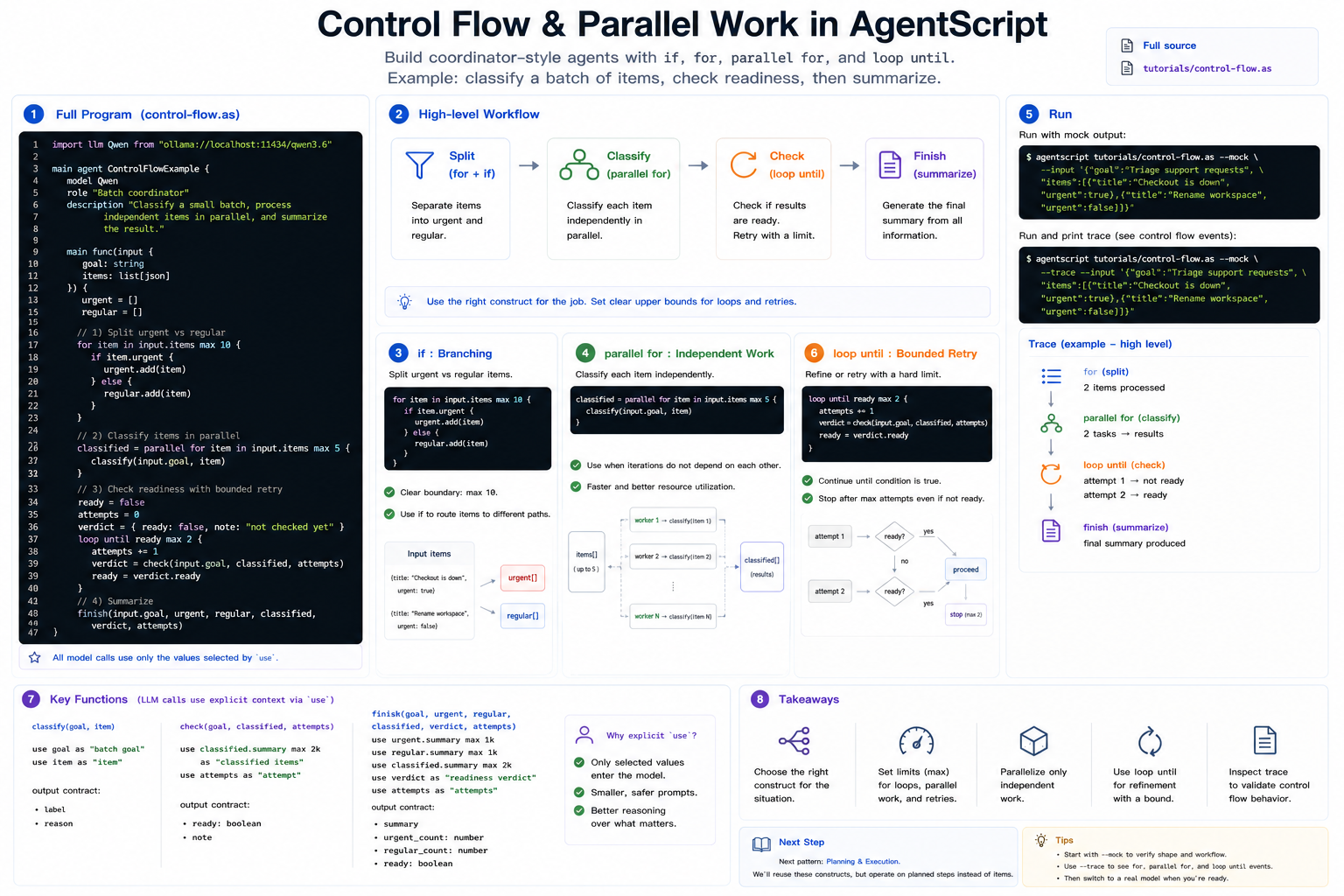
The example is a small batch coordinator. It splits urgent and regular items, classifies every item independently, checks whether the batch is ready, and then summarizes the result.
Full source: ../../../tutorials/control-flow.as
1. The Complete Program
Create control-flow.as, or open the repository copy at
tutorials/control-flow.as:
import llm Qwen from "ollama://localhost:11434/qwen3.6"

main agent ControlFlowExample {
    model Qwen
    role "Batch coordinator"
    description "Classify a small batch, process independent items in parallel, and summarize the result."

    main func(input {
        goal: string
        items: list[json]
    }) {
        urgent = []
        regular = []

        for item in input.items max 10 {
            if item.urgent {
                urgent.add(item)
            } else {
                regular.add(item)
            }
        }

        classified = parallel for item in input.items max 5 {
            classify(input.goal, item)
        }

        ready = false
        attempts = 0
        verdict = {
            ready: false,
            note: "not checked yet"
        }

        loop until ready max 2 {
            attempts += 1
            verdict = check(input.goal, classified, attempts)
            ready = verdict.ready
        }

        finish(input.goal, urgent, regular, classified, verdict, attempts)
    }

    func classify(goal, item) {
        use goal as "batch goal"
        use item as "item"

        generate({ input: "Classify this item for the batch goal", max_output: 300 }) -> {
            label
            reason
        }
    }

    func check(goal, classified, attempts) {
        use goal as "batch goal"
        use classified.summary max 2k as "classified items"
        use attempts as "attempt"

        generate({ input: "Decide whether the batch is ready to summarize", max_output: 300 }) -> {
            ready: boolean
            note
        }
    }

    func finish(goal, urgent, regular, classified, verdict, attempts) {
        use goal as "batch goal"
        use urgent.summary max 1k as "urgent items"
        use regular.summary max 1k as "regular items"
        use classified.summary max 2k as "classified items"
        use verdict as "readiness verdict"
        use attempts as "attempts"

        generate({ input: "Summarize the batch result", max_output: 600 }) -> {
            summary
            urgent_count: number
            regular_count: number
            ready: boolean
        }
    }
}
2. Branch With if
The first loop separates urgent items from regular items:
for item in input.items max 10 {
    if item.urgent {
        urgent.add(item)
    } else {
        regular.add(item)
    }
}
The max 10 limit is deliberate. Agent workflows should have visible bounds,
especially when they may later call tools or models inside a loop.
3. Use parallel for for Independent Work
Each item can be classified independently, so the example uses parallel for:
classified = parallel for item in input.items max 5 {
    classify(input.goal, item)
}
Use parallel for when each iteration can run without depending on the previous
iteration's result. If the next item depends on the last item, use ordinary
for.
4. Use loop until for Bounded Refinement
loop until is useful when an agent needs a small retry or refinement loop:
loop until ready max 2 {
    attempts += 1
    verdict = check(input.goal, classified, attempts)
    ready = verdict.ready
}
The loop is still bounded. If ready never becomes true, it stops after two
attempts.
5. Run It
Run with mock output:
agentscript tutorials/control-flow.as --mock --input '{"goal":"Triage support requests","items":[{"title":"Checkout is down","urgent":true},{"title":"Rename workspace","urgent":false}]}'
Print the trace to see the for, parallel for, and loop until events:
agentscript tutorials/control-flow.as --mock --trace --input '{"goal":"Triage support requests","items":[{"title":"Checkout is down","urgent":true},{"title":"Rename workspace","urgent":false}]}'
Next
The next pattern is Plan-and-Execute. It uses the same ideas, but turns the batch items into planned steps.